


Daily Weather: Weather Radar
4.212.00 Reviews
App Specs
- Version
- 1.0.1
- Updated On
- License
- Free
- Downloads
- 10,000+
- Developer
- WishSand Studio
- Categories
- Weather
- Platform
- Android
Screenshots
 Analysis by AppCompare
I lose more time than I’d like to admit checking the sky, opening a forecast, then checking again before I leave. That routine matters most when rain could change a commute or a quick errand into a soggy detour. Daily Weather: Weather Radar is aimed at making that decision easier: it brings weather information together so I can check conditions and get on with my day, rather than keep guessing.
It’s a free weather app from WishSand Studio, with a 4.2 average from around 55 ratings and over 10,000 installs. Those figures suggest a modest, growing audience, not a reason on their own to trust a forecast. I’d judge it by whether its information is convenient and useful for the places and plans that matter to me.
Your Personal Weather Companion
When I first open up Daily Weather: Weather Radar, it feels like you’ve got a personal meteorologist right in your pocket. The interface is super intuitive, which is great for those of us who aren’t exactly tech geniuses. Seriously, even your grandma could navigate this app without breaking a sweat.
Features That Shine Like the Sun
So, what makes this app stand out in the crowded world of weather apps? For starters, the real-time radar maps are a game-changer. You can literally watch the rain clouds rolling in from the comfort of your couch. It’s like having a weather channel on steroids.
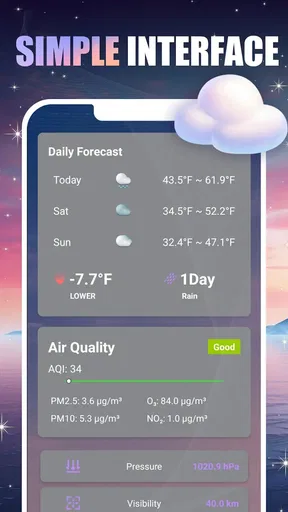
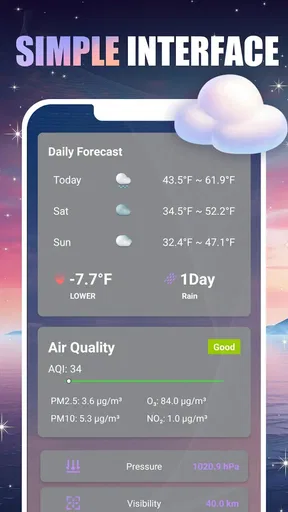
And let’s talk about the detailed forecasts. Whether you’re planning a weekend getaway or just trying to figure out if you need a jacket tomorrow, the app has got you covered. You get hourly updates, 7-day forecasts, and even minute-by-minute precipitation info. It’s like having a crystal ball for the weather.
Usability and Design
The design? Sleek and modern. The developers clearly thought about user experience, and it shows. With its clean layout and vibrant colors, checking the weather has never been this fun. And it’s not just a pretty face; the app is responsive and quick, so you’re not left hanging when you need information fast.
For a useful first setup, I’d begin with the place I check most often, then add another location only if I regularly need to compare conditions elsewhere. That keeps the daily glance simple while still making a destination available when plans change. If the app asks me to choose between a location-based view and a selected place, I’d use whichever matches my routine; there’s little value in maintaining locations I rarely check.
Worth Reading Before You Choose

Flipboard Shows What News Apps Must Do Beyond the Feed

Switching to Android Auto Means Rethinking Your Driving Routine

Google Calendar Makes a Crowded Week Easier to Manage

Ludo King Makes the Most of the Minutes Between Plans

Baby Panda World Brings Quick Play to Modern Phones, but Its Game Library Feels Busy

ESPN’s Live Game View Makes Following Close Games Easier
A practical way to test the radar is to look at it before leaving, then compare what it shows with the weather outside over the next short stretch of time. I wouldn’t treat a map as a promise that a shower will hit a particular street at an exact minute. Radar is most helpful for spotting the direction and movement of a weather system, while the forecast gives broader context. Using both together is more sensible than letting one colorful map make the decision for me.
Alerts and Notifications
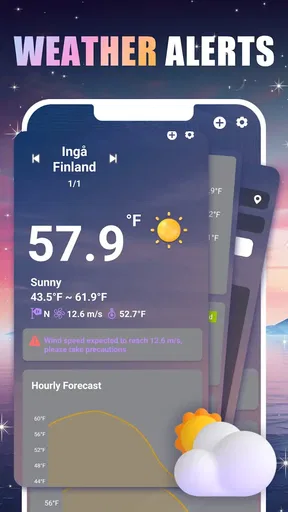
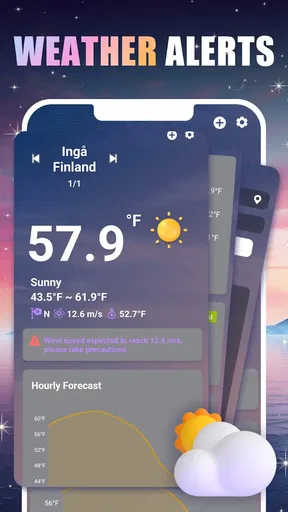
One of my favorite features has to be the customizable alerts. You can set up notifications for severe weather conditions or just a simple daily update. It’s like having a friendly weather warning system that’s got your back.
"The app gives you that peace of mind knowing you’ll never be caught off guard by the weather again."
Alerts are most useful when they solve a real problem, not when they become another stream of interruptions. I’d choose only the notices that could change what I do—such as a serious weather warning or a brief daily check-in—and leave the rest off if they start competing with messages and reminders. Before relying on any alert for a safety-critical decision, I’d still check an official local warning source; a phone notification is a useful prompt, not a substitute for emergency guidance.
Extra Perks
But wait, there’s more! The app also offers sunrise and sunset times, humidity levels, and wind speed details. For those who are a bit more into the nitty-gritty, you can dive into atmospheric pressure and visibility stats. It’s like having a full weather station at your fingertips.
Those extra readings earn their place when they answer a specific question. Wind speed can affect a bike ride or a walk with an umbrella; humidity can help explain why a mild temperature feels uncomfortable; visibility matters when I’m planning an early drive. I wouldn’t check every measurement every morning. I’d start with the forecast, then open the detail that affects the activity I’m planning.
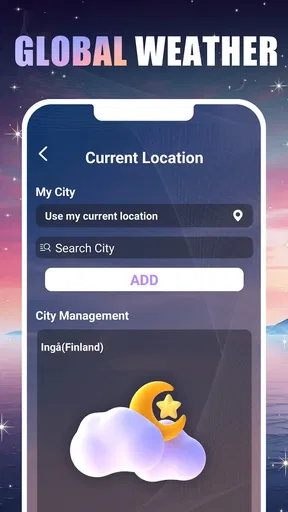
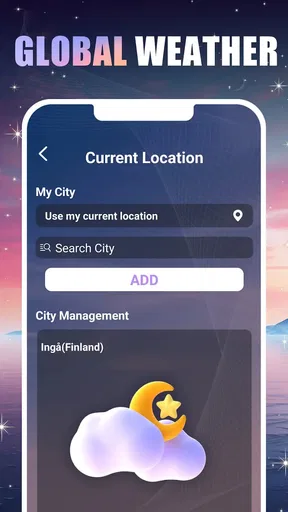
Another cool feature is the ability to add multiple locations. Planning a trip? You can easily switch between your home and your destination to see what the weather has in store for both places.
That location switching can make a small but meaningful difference to a travel day. I might check home before leaving, then look at the destination while packing, rather than assume the weather there will match what I see outside. For a route with several stops, though, a short location list is easier to use than a long collection of saved places; it keeps the comparison quick instead of turning a simple check into housekeeping.
Seamless Integration
The app also plays nice with other services. If you’re an iOS user, you’ll appreciate how it syncs up with your Apple Watch. Android users aren’t left out either; the widget feature lets you have the weather at a glance right from your home screen.
These at-a-glance options are handy when I only need a quick answer, but I’d use them as shortcuts rather than as a replacement for opening the full forecast. A glance at a widget can tell me whether to investigate further; a changing plan or a weather warning deserves a closer look. The app’s current version is 1.0.1, so I’d also make sure I’m using the version available to my device before deciding whether a particular convenience fits my setup.
And did I mention the app is free? Of course, there are in-app purchases if you want to unlock additional features, but the free version is pretty robust on its own.
It’s listed for everyone and requires Android 10 or later on Android devices. The app was released on April 21, 2026, and its early version is worth keeping in perspective: I’d try it with ordinary daily checks before making it the only source I consult for weather-sensitive plans. The 12 written reviews offer some user feedback, but a small review pool can’t tell me whether it will match conditions in every location.
When a Quick Check Helps Most
Picture a regular weekday: I’m getting ready to leave, the sky looks uncertain, and I have a walk to the bus stop before a longer commute. I can check the hourly outlook to decide whether to carry a rain jacket, then use the radar for a closer look at whether rain seems to be approaching. If the plan is an outdoor lunch later, I can check again nearer the time rather than treating the morning view as a guarantee for the whole day.
That workflow is where a focused weather app can save a few small decisions. It won’t remove the need to adapt when conditions change, but it can replace repeated searches across several screens with one routine: check the likely timing, inspect the radar if rain is relevant, and look at wind or humidity only when those details affect comfort. I find that more useful than collecting weather figures for their own sake.
It also suits someone coordinating plans with another person. I can check the destination before suggesting a walk or an outdoor errand, then share a practical conclusion—bring a layer, shift the time, or reconsider the plan—instead of forwarding a pile of readings. The forecast remains an estimate, so I’d leave room for changes rather than promise that the weather will cooperate.
How It Fits Among Weather Options
Compared with a basic phone weather screen, this app’s appeal is the combination of radar, forecast detail, alerts, and additional conditions in one place. A default weather app may be enough if I only want the current temperature and a quick glance; switching makes more sense when I actually use the map, compare locations, or want to check more than one time of day.
At the other end, dedicated specialist tools may be a better fit for people who need highly technical meteorological analysis or make work decisions that depend on detailed local monitoring. I wouldn’t assume that a general daily weather app replaces those tools. For ordinary choices—what to wear, when to leave, or whether an outing still looks comfortable—the broader set of everyday information is more relevant than specialist depth I may never use.
There’s a trade-off in having several kinds of information together: it can reduce app-hopping, but it can also tempt me to over-check. I’d keep the home view focused on the location and forecast I use most, and treat the extra readings as occasional tools. If I find myself opening the app repeatedly without changing a decision, the app is no longer saving time; a simple morning check and another before an outdoor plan may be enough.
Where I’d Draw the Line
I’d skip this kind of app if I rarely make plans based on the weather and a basic built-in forecast already answers my only question. I’d also choose a specialist source when precise, authoritative information is essential—for example, when an official alert or professional forecast is needed to guide a high-stakes decision. The radar and notifications are conveniences, not guarantees that severe weather will be predicted perfectly or that every local change will be captured in time.
There’s also a little setup friction: alerts and saved locations are only helpful after I decide which ones belong in my routine. Someone who enables every notification or adds places for one-off checks may end up with noise rather than clarity. I’d keep the setup lean, try it across normal days, and adjust only when a missed detail would have changed a real decision.
For readers wondering whether the app is suitable for a family device, its content rating is Everyone. That’s a straightforward fit for a general-purpose weather tool, though I’d still handle notification choices and location settings according to how the device is shared. On Android, the minimum operating system is version 10; users on older systems should check compatibility before planning around it.
Final Thoughts
So, is Daily Weather: Weather Radar worth your time? In a word: yes. Whether you’re planning your next adventure or just trying to avoid getting drenched on your morning commute, this app has the tools to help you outsmart the weather. It’s like having a trusty weather sidekick by your side.
My recommendation is strongest for someone who checks the weather most days and wants radar, timing, and useful conditions close at hand without turning each check into research. I’d be more cautious if you need specialist-grade certainty, depend on official warnings for safety, or are already satisfied with a simple forecast. The best test is practical: add your usual location, set only the alerts you’d welcome, and see whether the information helps you make a quicker decision.
Give it a whirl and see how it fits into your daily routine. Who knows, it might just become one of those apps you can’t live without.
Pros
- Accurate local weather forecasts.
- Interactive radar with real-time updates.
- Customizable weather alerts.
- User-friendly and intuitive interface.
- Detailed 7-day weather outlook.
Cons
- Ad-supported version can be distracting.
- Limited features for free users.
- Some radar data may load slowly.
- Occasional notification glitches.
- Premium version is relatively pricey.
FAQs for Daily Weather: Weather Radar
What features does the Daily Weather app offer?
Daily Weather provides real-time weather updates, detailed forecasts, and interactive radar maps. Users can access hourly and weekly forecasts, receive severe weather alerts, and customize their locations for tailored updates. The app's intuitive interface makes it easy to switch between different views, ensuring you stay informed about weather changes.
Is the Daily Weather app free to use, or are there in-app purchases?
The Daily Weather app is free to download and use. However, it offers in-app purchases for premium features such as ad-free experiences, advanced radar capabilities, and extended forecasts. These optional purchases enhance the user experience but are not necessary for basic functionality.
How accurate is the weather data provided by the app?
The Daily Weather app sources its data from reliable meteorological services, ensuring high accuracy. The app uses advanced algorithms to deliver precise weather predictions and updates. Users generally find the forecasts to be dependable, though it's always wise to cross-reference with local sources during critical weather events.
Can I receive severe weather alerts with the Daily Weather app?
Yes, the app provides timely severe weather alerts to keep you informed about potential hazards. You can customize these alerts based on your preferences and locations. This feature is particularly useful for staying prepared during extreme weather conditions, ensuring safety and timely response.
Does the app require a constant internet connection to function?
While the Daily Weather app performs best with an internet connection for real-time updates, it can still provide basic forecasts offline. Cached data allows you to view the latest downloaded information even without connectivity, though features like radar and live alerts require an internet connection to stay updated.


